A 360 virtual tour lets buyers walk through your project from their phone, look wherever they want and understand where each lot is without visiting the site. Done well, they arrive at the sales meeting with specific questions instead of basic ones.
In this guide I show you the full process we follow to make a 360 tour of a real estate project, with what works and the mistakes worth avoiding.
What is a 360 virtual tour?
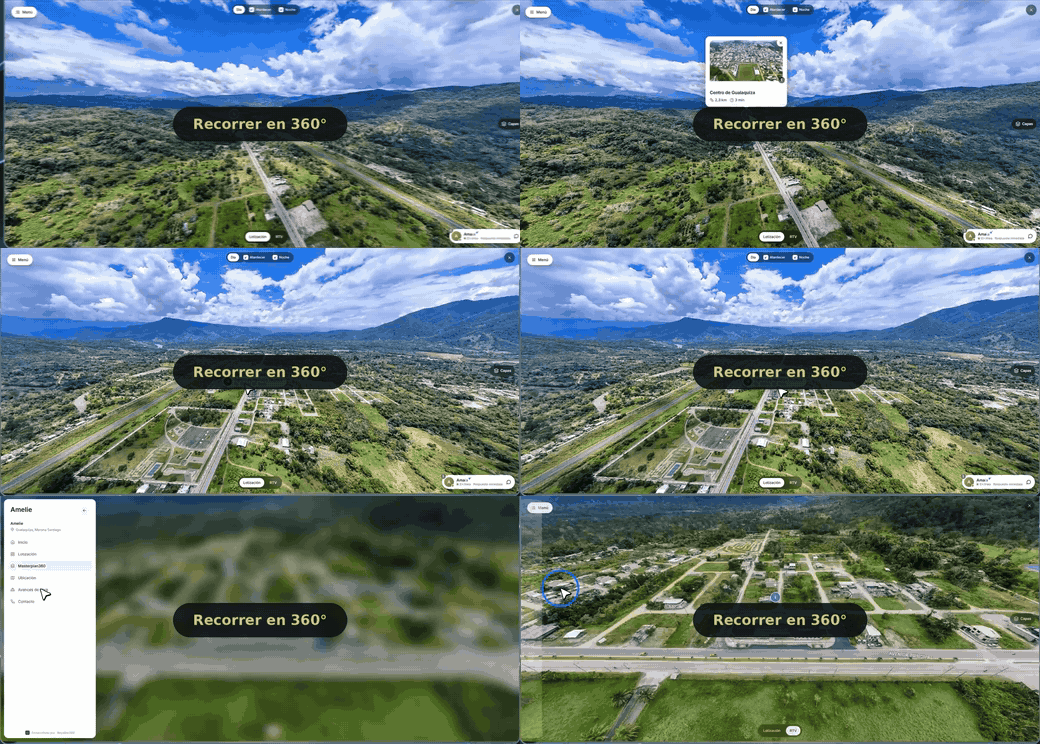
It is a walkthrough made of 360-degree panoramic photos (equirectangular images, article in Spanish) linked together. The user moves from one point to another and turns the view with a finger or the mouse. Unlike a video, nobody tells them what to look at.
What turns it into a sales tool is what goes on top of the photos:
- Information points: the project's measurements, prices and amenities without having to ask.
- Lot plan: which lots are available, reserved or sold.
- Contact: a button to leave contact details or send a WhatsApp message from within the tour.
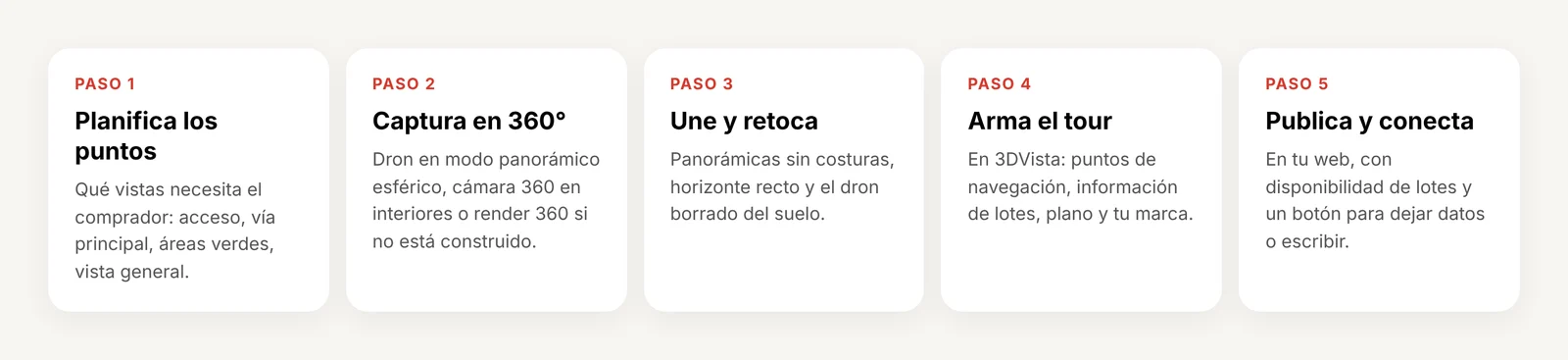
Step 1. Plan the points of the tour
Before you fly or turn on the camera, decide what the buyer needs to see. In a land subdivision these are usually:
- The overall view of the land and its surroundings: access roads, the city or nearby services.
- The entrance and the project's main road.
- The green, common or recreation areas.
- One or two points inside each lot area.
Fewer, well-chosen points work better than many similar ones. Each point should answer a buyer's question.
Step 2. Capture the panoramas
With a drone (land and subdivisions)
For a plot of land or a subdivision, the aerial view is what gives context. Many drones have a spherical panorama mode that takes and stitches the photos on its own. Fly in good light, avoid midday if there are harsh shadows, and respect the maximum altitude and the permits required by the regulations in your country.
With a 360 camera (interiors and built spaces)
For houses, apartments or a model home, use a 360 camera such as Insta360 or Ricoh Theta on a tripod at eye level. Step out of the frame or hide behind a column before you shoot.
With 360 renders (what does not exist yet)
If the project is still on paper, it can be modeled in 3D and rendered in 360 with Blender. This is the most common approach for off-plan sales.
Step 3. Stitch and retouch the panoramas
Check each panorama before building the tour:
- No visible seams where the photos are joined.
- A straight horizon.
- In drone shots, no warped ground visible underneath; it is usually covered with a logo or a patch.
- Similar color and exposure between points, so the tour feels continuous.
Step 4. Build the tour in 3DVista
3DVista is the program we use to build the tour. It works with a one-time license. In it you:
- Import the panoramas and connect them with navigation points.
- Add information points with text, photos or videos.
- Add a plan or map so the user knows where they are.
- Add your branding and a visible contact button.
Other options are Kuula, simpler and online, or Matterport, designed to scan interiors with its own equipment.
Your first steps in 3DVista, on video
My channel has short tutorials to get started: connecting the photos, showing text and images, and improving the sky in a panorama. The videos are in Spanish.


Step 5. Publish the tour and connect it to your sales
The tour is exported as a web page and published on the project's website. It is not a YouTube video: it runs in the browser, on phones and computers.
This is where most people stop. A standalone tour behind a link brings visits but not clients. To sell, it needs:
- Up-to-date lot availability, so nobody asks about a lot that is already sold.
- A form or a WhatsApp button that reaches your team.
- A place where every interested person and their follow-up is recorded.
How much does a 360 virtual tour cost?
It depends on how many points it has, whether renders are needed and how much it is integrated with your website. These are approximate ranges for Latin America:
| Component | Approximate range |
|---|---|
| 360 capture with drone or camera | $200 to $1,000 depending on the number of points |
| 360 renders (if the project does not exist yet) | $300 to $1,500 |
| Building the tour | $500 to $2,500 |
| Integration with website and CRM | $300 to $1,000 |
| Total | from $1,000; with renders and integration it can exceed $5,000 |
If you do it yourself, the main cost is the equipment (drone or 360 camera) and the software license. Check current prices on each manufacturer's website.
Common mistakes
1. Publishing the tour and not connecting it to anything. Without contact or follow-up, visits do not turn into clients.
2. Dark or blurry photos. In 360 everything shows. A bad shot creates distrust.
3. Too many similar points. The user gets bored and leaves. Choose the points that answer questions.
4. Not showing sales information. Prices, measurements and availability are what the buyer wants to see.
Do it yourself or hire someone?
If you already have a drone or a 360 camera and time to learn 3DVista, you can do it yourself and this guide is your starting point. If what you need is to sell a project and you do not want to put every piece together, it makes sense for the tour, the lot plan and client follow-up to come together.